
重写历史记录既强大又危险,它允许我们重写历史记录。我们可以删除或修改提交,可以合并或拆分它们等等。本文我们将讨论为什么以及何时重写历史记录、撤销或还原提交、使用交互式变基以及恢复丢失的提交等内容。
为什么要重写历史记录
我们为什么需要历史记录?
我们需要了解哪些内容发生了更改,以及更改的原因和时间。
如果我们的提交信息没有意义,或者我们的提交太大,包含不相关的更改,或者提交太小,分散在整个历史记录中,那么我们将无法从历史记录中提取有意义的信息。我们需要一个清晰易读的历史记录。
如果您有一些相关的小提交,我们可以将它们合并成一个代表逻辑变更集的单个提交。另一方面,如果您有一个包含大量不相关更改的大提交,我们可以将该提交拆分成许多较小的提交,每个提交代表一个逻辑上独立的变更集。
我们还可以回顾提交信息,使其更有意义。如果我们不小心提交了更改,可以将其删除。我们还可以修改提交的内容。
但是,重写历史记录可能很危险,在修改历史记录之前,您需要清楚自己在做什么。
重写历史的黄金法则
不要重写公用的提交!
如果您与其他协同工作,分享给其他人的提交就被称为公用的提交。我们不应该修改这些提交。
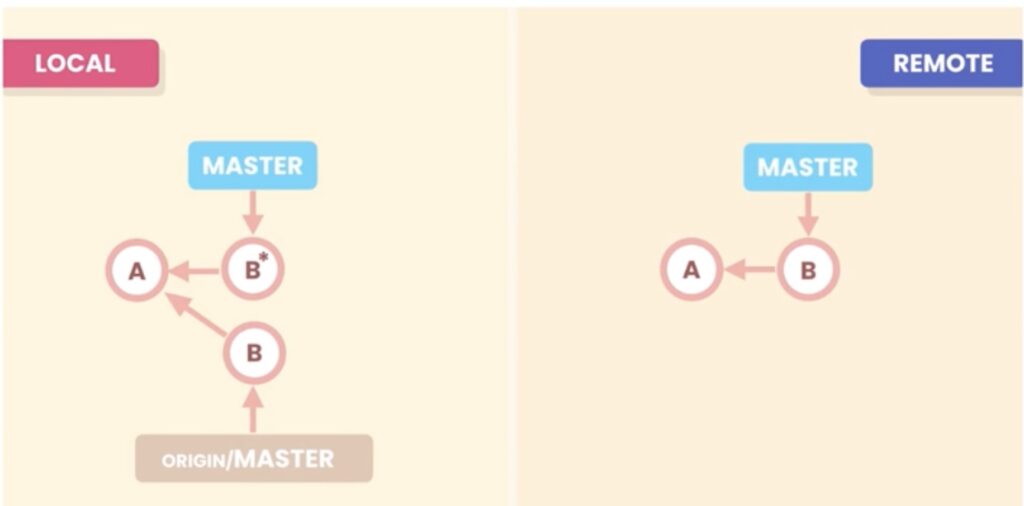
如图,我们要修改公用提交 B。实际上,已生成的提交B是不可改变的,Git会创建一个新的提交 B* ,而B则会放置在Git的数据库里。修改完毕,我们用 git push提交,会发生什么?
Git会拒绝。因为Master是分离的,我们必须先将 origin/master 合并到master,然后才能进行git push。这样就会得到一个非线性比较混乱的提交。
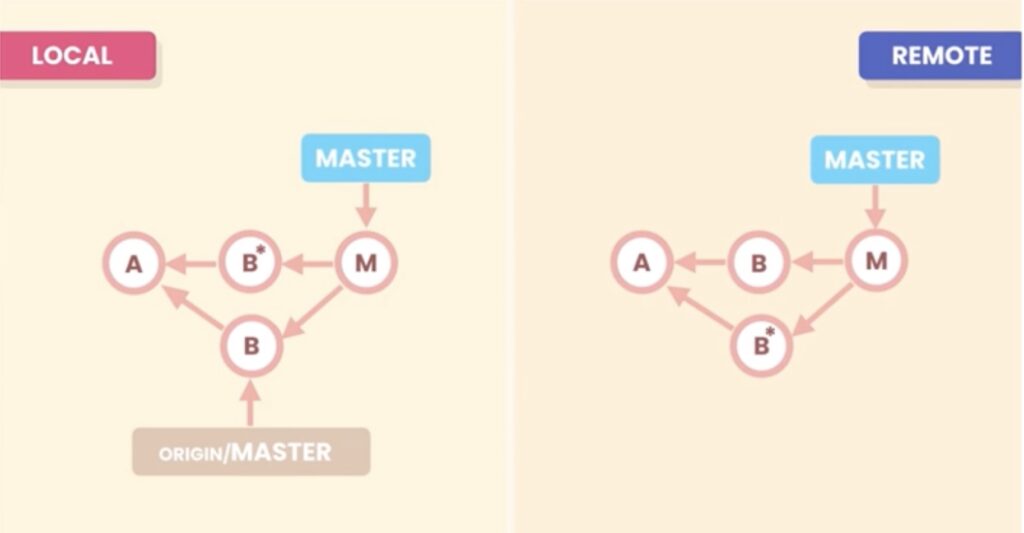
有一个替代方案,就是加 force 参数。它将强制将B*替换B。
git push -force
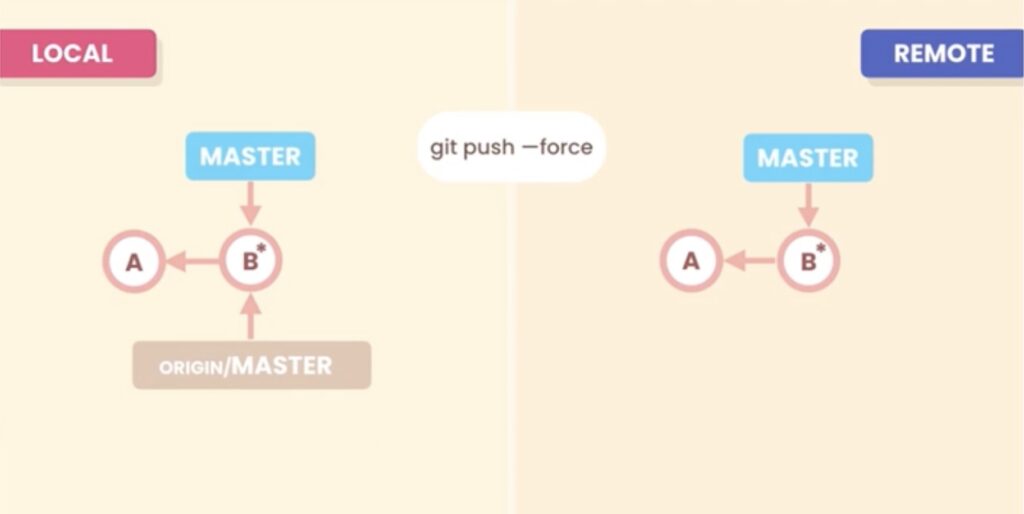
你可能会认为这不错,我们是否应该在所有场景都加上 force参数呢?不是这样的。
另一个协同用户比如叫John,他不清楚B*。他添加了C,然后想提交,结果就会被拒绝,因为master与origin/master是分离的。他首先得进行一次pull,然后进行合并。这样又变成了混乱的提交了!
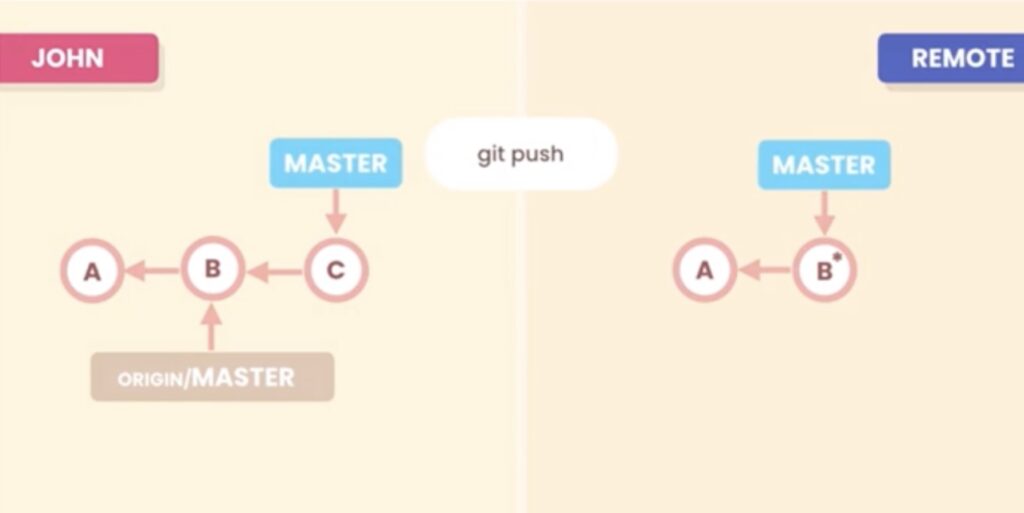
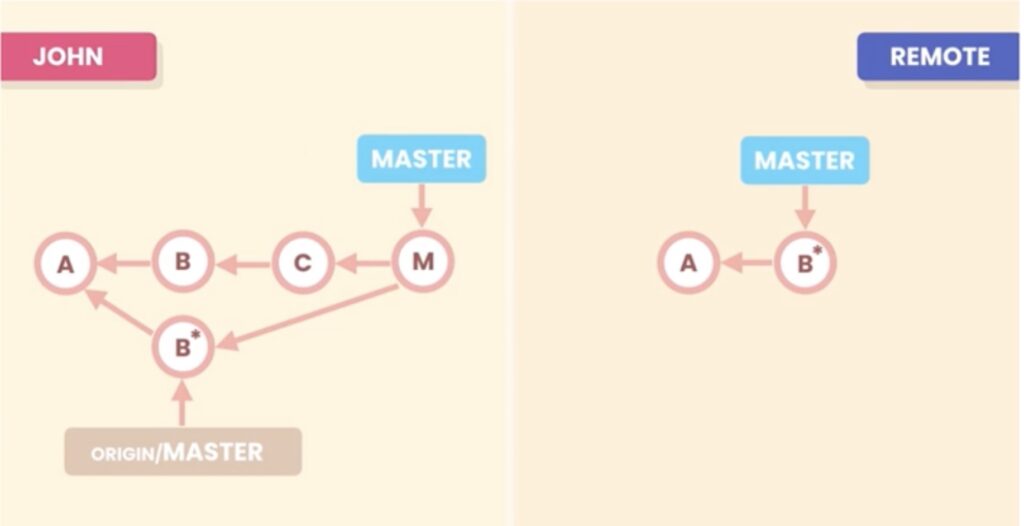
所以,不要重写公用的提交!
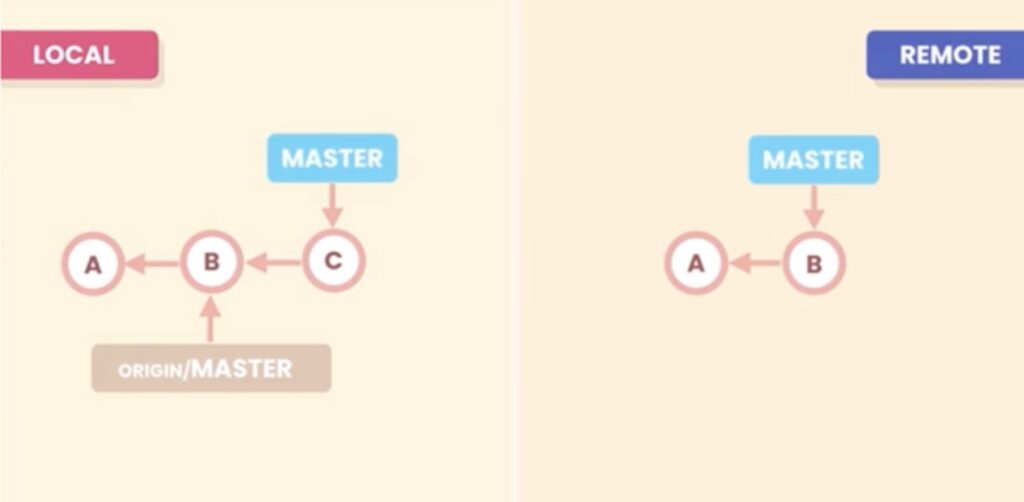
我们只应该重写私有提交,比如下图的C,它是私有提交,别人均不清楚该提交,我们就可以进行重写。
糟糕的历史记录示例
我们来看一个糟糕的提交历史:
❯ git log --oneline --graph
* 088455d (HEAD -> master) .
* f666091 WIP
* 111bd75 Update terms of service and Google Map SDK version.
* 72856ea WIP
* 8441b05 Add a reference to Google Map SDK.
* 8527033 Change the color of restaurant icons.
* af26a96 Fix a typo.
* 6fb2ba7 Render restaurants the map.
* 70ef834 Initial commit
它们都有什么问题呢?
6fb2ba7 在地图上渲染餐厅。-> 更准确的描述应为“……地图上的餐厅。”
af26a96 修复拼写错误。-> 我们本来就不应该有拼写错误,这样的提交会污染历史记录。所以我们可以将它们与其他提交合并。
8527033 更改餐厅图标的颜色。-> 这是餐厅相关工作的同一部分,因此所有这些提交都应该合并。
8441b05 添加对 Google Maps SDK 的引用。-> 这里的问题是,如果我们检出提交 6fb2ba7,我们的应用程序将无法工作,因为 Google Maps SDK 的引用在后面。我们应该将此提交移到 6fb2ba7 之前,或者合并这两个提交。
72856ea WIP -> “Work In Progress”(进行中)提交只是一个无意义的提交,我们应该删除它、更改消息或将其合并。
111bd75 更新服务条款和 Google 地图 SDK 版本。-> 理想情况下,我们应该将这些提交分成两个提交,因为更新服务条款与更新 Google 地图 SDK 无关。
088455d (HEAD -> master) . -> 这是一个神秘的消息提交,我们应该删除它或修改此消息。
重置提交 RESET
正如我们之前看到的,如果我们已经将提交推送到公共远程存储库,我们就不应该将其删除。
❯ git log --oneline --graph
* 088455d (HEAD -> master) .
* f666091 WIP
* 111bd75 Update terms of service and Google Map SDK version.
* 72856ea WIP
* 8441b05 Add a reference to Google Map SDK.
* 8527033 Change the color of restaurant icons.
* af26a96 Fix a typo.
* 6fb2ba7 Render restaurants the map.
* 70ef834 Initial commit
例如,如果我们想要撤销最后一次提交 088455d(HEAD -> master),我们有两种选择:
撤销提交 -> 该提交已推送到公共远程仓库
重置提交 -> 该提交尚未推送到公共远程仓库
重置提交
重置提交会将该提交从历史记录中移除。我们使用 `reset` 命令,并且必须指定目标提交。我们可以使用 `HEAD~n` 语法来实现,它表示从 HEAD 指向的提交(通常是最后一个提交)向前追溯 n 个提交。
git reset –hard HEAD~1
重置命令有以下选项:
–soft -> 仅移除提交
–mixed -> 取消暂存文件
–hard -> 放弃本地更改
例如,假设我们的本地仓库 A 和 B 中有两个提交,B 是最后一个提交,因为 HEAD 指向它。暂存区和工作目录中的代码与上次快照(本地仓库)中的代码相同。
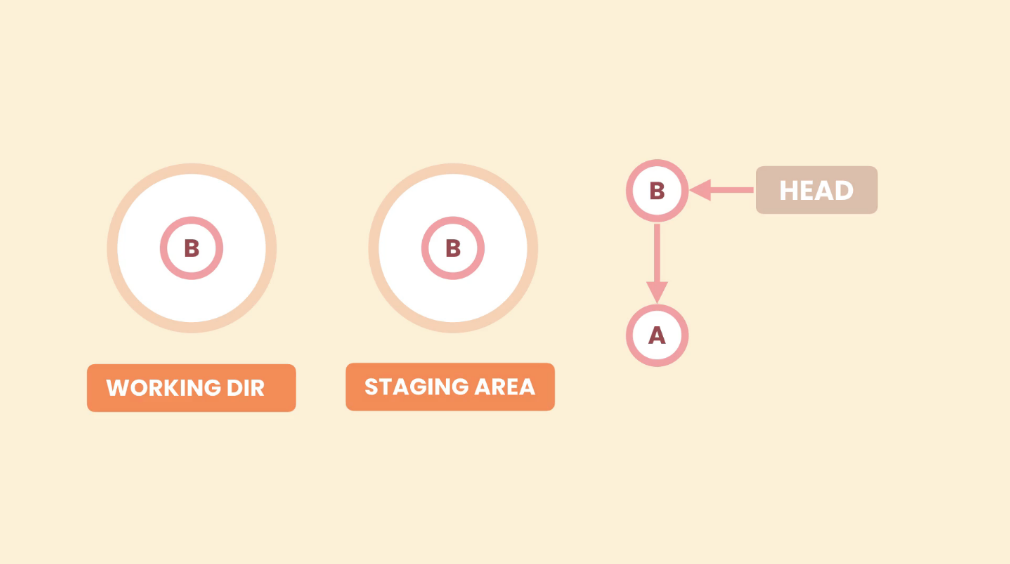
选项 –soft
–soft 选项只会更改本地仓库,仅删除提交。
如果我们使用 `git reset –soft HEAD~1`,Git 会将 HEAD 指向本地仓库的目标位置,但不会触及暂存区和工作目录。
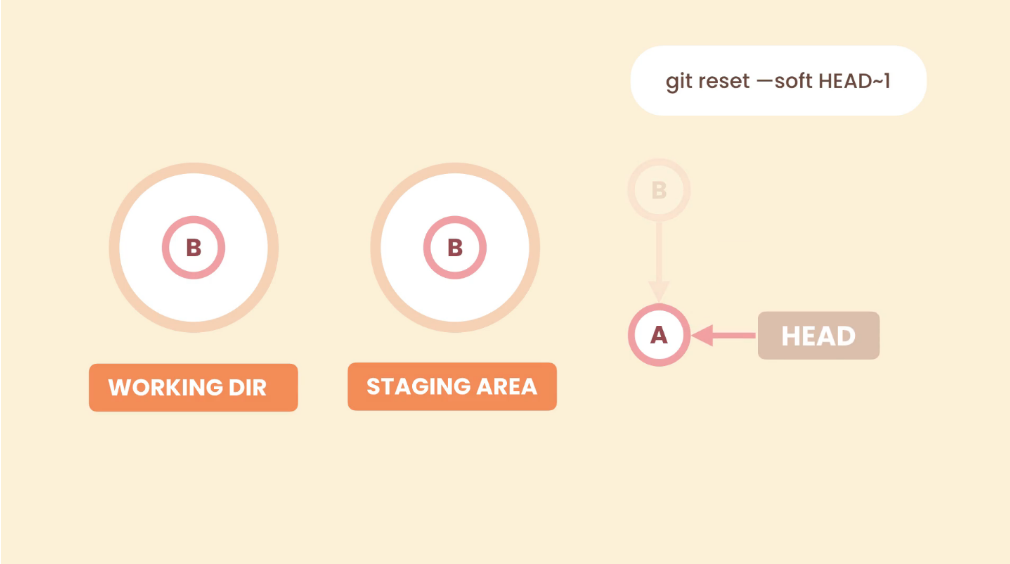
这与提交 B 之前的状态相同。暂存区和工作目录中有一些尚未提交的更改。
–mixed 选项
–mixed 选项会同时更改本地仓库和暂存区。它会回退一步,取消暂存更改。
使用 –mixed 选项时,Git 会将 HEAD 指针从 B 移动到 A(与 –soft 选项相同),并将最新的快照也放入暂存区,但不会触及工作目录。
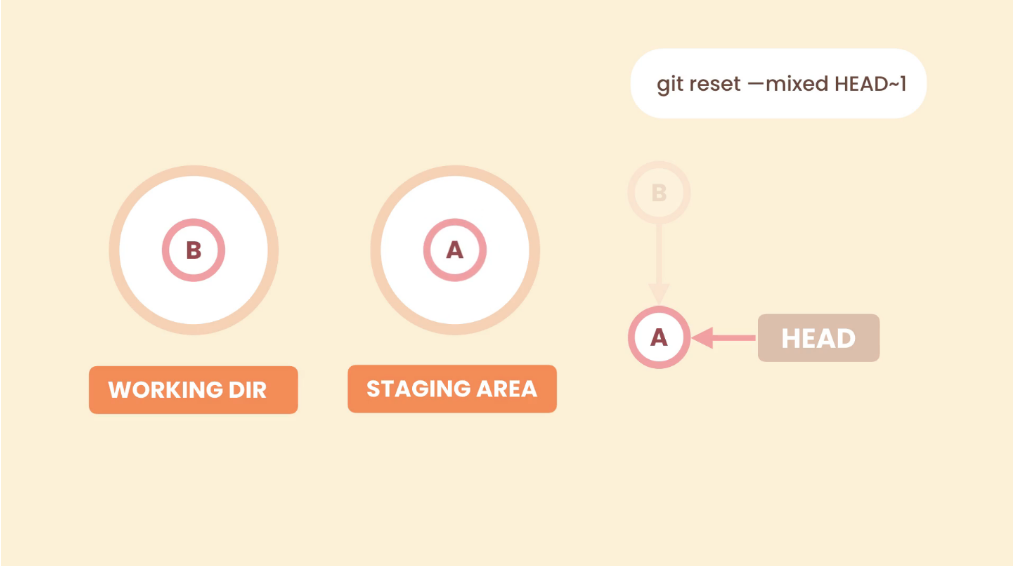
这与我们暂存更改之前的状态相同。工作目录中有一些尚未暂存的更改。
–hard 选项
–hard 选项会更改本地仓库、暂存区和工作目录。即使再回退一步,也会丢弃本地更改。
使用 –hard 选项时,Git 会将 HEAD 指针从 B 移动到 A(与 –soft 选项相同),并将最后一个快照放入暂存区和工作目录中。因此,工作目录中的新更改将被删除。
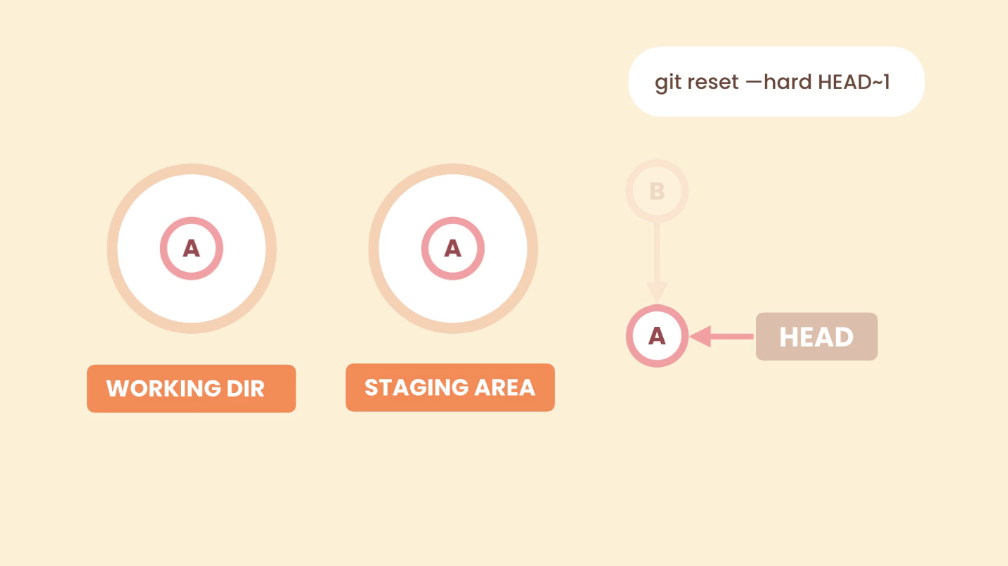
撤销(回滚)提交 REVERT
如果我们已经将提交推送到公共远程仓库,则不应使用 reset 命令,而应使用 revert 命令,这将基于目标提交创建一个新的提交。
要回滚单个提交,我们需要将该提交传递给 revert 命令。可以通过提交 ID 或 HEAD~n 语法来实现。这将创建一个新的提交。
回滚前的历史记录:
❯ git log --oneline --graph
* 088455d (HEAD -> master) .
* f666091 WIP
* 111bd75 Update terms of service and Google Map SDK version.
* 72856ea WIP
* 8441b05 Add a reference to Google Map SDK.
* 8527033 Change the color of restaurant icons.
* af26a96 Fix a typo.
* 6fb2ba7 Render restaurants the map.
* 70ef834 Initial commit
执行回滚:
❯ git revert HEAD~1
[master 1b7aed7] Revert "WIP"
 1 file changed, 1 deletion(-)
回滚后的历史记录:
❯ git log --oneline --graph
* 1b7aed7 (HEAD -> master) Revert "WIP"
* 088455d .
* f666091 WIP
* 111bd75 Update terms of service and Google Map SDK version.
* 72856ea WIP
* 8441b05 Add a reference to Google Map SDK.
* 8527033 Change the color of restaurant icons.
* af26a96 Fix a typo.
* 6fb2ba7 Render restaurants the map.
* 70ef834 Initial commit
上述命令会撤销最后一次提交,因此它会创建一个新的提交,撤销最后一次提交所做的更改。我们也可以回滚一系列提交。
我们可以使用 .. 表示法撤销一系列提交,例如:
git revert HEAD~4..HEAD
或者
git revert 8441b05..1b7aed7
请注意,上述示例中的第一个提交 HEAD~4 或 8441b05 不包含在内。此操作将为每个回滚的提交创建一个新的提交。
回滚前的历史记录:
❯ git log --oneline --graph
* 088455d (HEAD -> master) .
* f666091 WIP
* 111bd75 Update terms of service and Google Map SDK version.
* 72856ea WIP
* 8441b05 Add a reference to Google Map SDK.
* 8527033 Change the color of restaurant icons.
* af26a96 Fix a typo.
* 6fb2ba7 Render restaurants the map.
* 70ef834 Initial commit
回滚后的历史记录:
❯ git log --oneline --graph
* 645357e (HEAD -> master) Revert "WIP"
* 685ec4e Revert "Update terms of service and Google Map SDK version."
* 6a65dda Revert "WIP"
* a0262f0 Revert "."
* 088455d .
* f666091 WIP
* 111bd75 Update terms of service and Google Map SDK version.
* 72856ea WIP
* 8441b05 Add a reference to Google Map SDK.
* 8527033 Change the color of restaurant icons.
* af26a96 Fix a typo.
* 6fb2ba7 Render restaurants the map.
* 70ef834 Initial commit
与其为每个回滚的提交创建一个新的提交(这可能会污染历史记录),我们可以使用 `–no-commit` 选项,该选项只会为所有回滚的提交创建一个提交。启用此选项后,Git 会将每个回滚提交所需的更改添加到暂存区。
git revert –no-commit HEAD~4..HEAD
如果运行 git status 命令,我们可以看到最近 4 次提交的反向更改。
❯ git status
On branch master
You are currently reverting commit 72856ea.
  (all conflicts fixed: run "git revert --continue")
  (use "git revert --skip" to skip this patch)
  (use "git revert --abort" to cancel the revert operation)

Changes to be committed:
  (use "git restore --staged <file>..." to unstage)
    modified:   map.txt
    modified:   package.txt
    deleted:    terms.txt
如果我们对更改感到满意,则使用 –continue 选项。
git revert –continue
或者,如果我们想要中止操作,可以使用 –abort 选项。
git revert –abort
回滚后的历史记录:
❯ git log --oneline --graph
* b7ed3ee (HEAD -> master) Revert last 4 commits
* 088455d .
* f666091 WIP
* 111bd75 Update terms of service and Google Map SDK version.
* 72856ea WIP
* 8441b05 Add a reference to Google Map SDK.
* 8527033 Change the color of restaurant icons.
* af26a96 Fix a typo.
* 6fb2ba7 Render restaurants the map.
* 70ef834 Initial commit
恢复丢失的提交
使用 reflog 命令,我们可以查看引用(或指针)在历史记录中的移动日志。如果不提供任何选项,我们将看到 HEAD 指针在历史记录中的移动情况。git reflog <引用>
❯ git reflog
088455d (HEAD -> master) HEAD@{0}: reset: moving to HEAD~1
b7ed3ee HEAD@{1}: commit: Revert last 4 commits
088455d (HEAD -> master) HEAD@{2}: reset: moving to HEAD~4
645357e HEAD@{3}: revert: Revert "WIP"
685ec4e HEAD@{4}: revert: Revert "Update terms of service and Google Map SDK version."
6a65dda HEAD@{5}: revert: Revert "WIP"
a0262f0 HEAD@{6}: revert: Revert "."
088455d (HEAD -> master) HEAD@{7}: reset: moving to
[...]
088455d (HEAD -> master) HEAD@{27}: commit: .
f666091 HEAD@{28}: commit: WIP
111bd75 HEAD@{29}: commit: Update terms of service and Google Map SDK version.
72856ea HEAD@{30}: commit: WIP
8441b05 HEAD@{31}: commit: Add a reference to Google Map SDK.
8527033 HEAD@{32}: commit: Change the color of restaurant icons.
af26a96 HEAD@{33}: commit: Fix a typo.
6fb2ba7 HEAD@{34}: commit: Render restaurants the map.
70ef834 HEAD@{35}: commit (initial): Initial commit
reflog 命令的每个条目都以操作后指向的提交 HEAD 开头,后跟一个唯一标识符。在本例中,第一个条目是 HEAD@{0},第二个条目是 HEAD@{1},依此类推。标识符后面显示的是执行的操作。
因此,我们可以回滚这些操作来恢复丢失的提交。在本例中,HEAD@{0} 操作重置了 HEAD~1。我们可以使用 reset 命令恢复丢失的提交。我们可以使用提交标识符或提交 ID。
恢复前的历史记录:
❯ git log --all --oneline --graph
* 088455d (HEAD -> master) .
* f666091 WIP
* 111bd75 Update terms of service and Google Map SDK version.
* 72856ea WIP
* 8441b05 Add a reference to Google Map SDK.
* 8527033 Change the color of restaurant icons.
* af26a96 Fix a typo.
* 6fb2ba7 Render restaurants the map.
* 70ef834 Initial commit
恢复操作:
❯ git reset –hard HEAD@{1}
HEAD is now at b7ed3ee Revert last 4 commits
恢复后:
❯ git log --all  --oneline --graph
* b7ed3ee (HEAD -> master) Revert last 4 commits
* 088455d .
* f666091 WIP
* 111bd75 Update terms of service and Google Map SDK version.
* 72856ea WIP
* 8441b05 Add a reference to Google Map SDK.
* 8527033 Change the color of restaurant icons.
* af26a96 Fix a typo.
* 6fb2ba7 Render restaurants the map.
* 70ef834 Initial commit
修改最后一次提交
如果上次提交出现错误,例如消息拼写错误,或者添加了不应该存在的文件,我们可以修改该提交。实际上,我们并没有修改上次提交,Git 会创建一个新的提交,因为 Git 提交是不可变的。
修改提交消息或添加更改
使用 `–amend` 选项,我们可以向上次提交添加更多更改或修改提交消息。如果需要向上次提交添加更多代码更改,首先需要暂存这些更改,然后运行 `git commit –amend -m <消息>`。也可以省略消息参数,直接接受上次提交的消息,这样运行 `git commit –amend` 将打开默认编辑器并显示上次提交的消息。
git commit –amend
从上次提交中移除一个文件
要从上次提交中删除文件,首先需要使用带有 `–mixed` 选项的 `git reset –mixed HEAD~1` 命令。这条命令会取消 Git 的暂存更改,但不会影响工作目录。
然后我们可以重新暂存所需的更改,并执行一次正常的提交。
git reset --mixed HEAD~1
git add <files>
git commit -m <commit message>
这里我们不使用 –amend 选项,因为我们已经重新定位了 HEAD,所以最后一个提交已经不存在了。
修改先前的提交修改承诺
要修改之前的提交,我们使用交互式变基。通过变基,我们可以将其他提交叠加到某个提交之上。首先,我们选择需要修改的提交,并使用 `-i` 选项将其父提交传递给变基命令,例如 `git rebase -i <commit>`。我们可以修改一个或多个提交。即使没有进行编辑,Git 也会重新创建每个经过变基操作的提交。
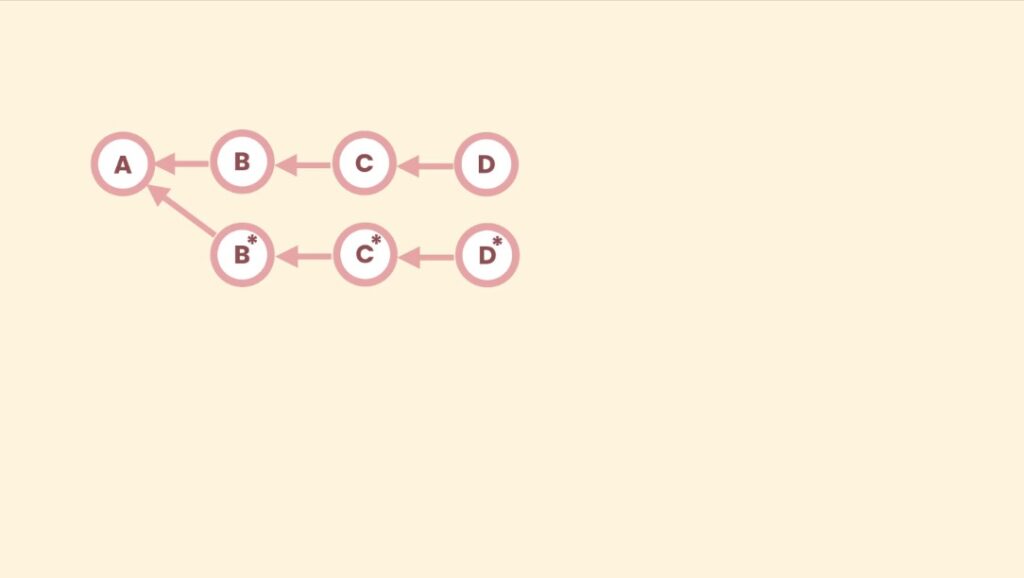
在上图中,假设我们只修改了提交 B,Git 会重新创建 C 和 D,使其指向新的提交 B,而不是新的提交 B。
变基是一种破坏性操作,因为它会重写历史记录。
`-i` 选项表示我们将与变基操作进行交互,可以停止它、进行更改、继续它或中止它。
此命令将打开默认编辑器,其中包含一个脚本,列出所有需要变基的提交以及执行变基操作的指令。如下例所示:
pick 8f1440a Add a reference to Google Map SDK.
pick 098a4bc Render restaurants the map.
pick 0bf60fe Fix a typo.
pick dd8f07e Change the color of restaurant icons.
pick ba55176 Update terms of service and Google Map SDK version.
pick f820221 WIP
pick 65dbb96 .

# Rebase 70ef834..65dbb96 onto 70ef834 (7 commands)
#
# Commands:
# p, pick <commit> = use commit
# r, reword <commit> = use commit, but edit the commit message
# e, edit <commit> = use commit, but stop for amending
# s, squash <commit> = use commit, but meld into previous commit
# f, fixup <commit> = like "squash", but discard this commit's log message
# x, exec <command> = run command (the rest of the line) using shell
# b, break = stop here (continue rebase later with 'git rebase --continue')
# d, drop <commit> = remove commit
# l, label <label> = label current HEAD with a name
# t, reset <label> = reset HEAD to a label
# m, merge [-C <commit> | -c <commit>] <label> [# <oneline>]
# .       create a merge commit using the original merge commit's
# .       message (or the oneline, if no original merge commit was
# .       specified). Use -c <commit> to reword the commit message.
#
# These lines can be re-ordered; they are executed from top to bottom.
#
# If you remove a line here THAT COMMIT WILL BE LOST.
#
# However, if you remove everything, the rebase will be aborted.
#
脚本配置完成后,重新定基操作开始。
❯ git rebase -i 8527033
Stopped at 8441b05...  Add a reference to Google Map SDK.
You can amend the commit now, with

  git commit --amend '-S'

Once you are satisfied with your changes, run

  git rebase --continue
在这里我们可以进行必要的更改,然后修改提交。完成后,运行 `git rebase –continue` 继续操作。
要随时中止变基操作,请使用 `–abort` 选项。例如:`git rebase –abort`。
在变基操作中,先前提交中引入的更改将沿提交历史传递下去。
删除提交
要删除提交,我们使用交互式变基操作。因此,我们需要将要删除的提交的父提交传递给变基操作,例如 `git rebase-i <parent-commit>`。
在交互式变基操作中,可能会出现冲突。例如,我们想要删除提交 72856ea,但该提交引入了一个新文件,该文件在下一个提交 111bd75 中使用,因此会引发冲突。
❯ git log --oneline --graph --all
* b7ed3ee (HEAD -> master) Revert last 4 commits
* 088455d .
* f666091 WIP
* 111bd75 Update terms of service and Google Map SDK version.
* 72856ea WIP
* 8441b05 Add a reference to Google Map SDK.
* 8527033 Change the color of restaurant icons.
* af26a96 Fix a typo.
* 6fb2ba7 Render restaurants the map.
* 70ef834 Initial commit
要选择提交 72856ea 的父提交,我们可以使用多种语法,例如 72856ea~1 或 72856ea^。当我们运行交互式变基操作,并在脚本操作中选择 drop 时,系统会提示冲突警告信息。
❯ git rebase -i 72856ea~1
CONFLICT (modify/delete): terms.txt deleted in HEAD and modified in 111bd75 (Update terms of service and Google Map SDK version.). Version 111bd75 (Update terms of service and Google Map SDK version.) of terms.txt left in tree.
error: could not apply 111bd75... Update terms of service and Google Map SDK version.
Resolve all conflicts manually, mark them as resolved with
"git add/rm <conflicted_files>", then run "git rebase --continue".
You can instead skip this commit: run "git rebase --skip".
To abort and get back to the state before "git rebase", run "git rebase --abort".
Could not apply 111bd75... Update terms of service and Google Map SDK version.
在简短的状态下,我们可以看到 terms.txt 文件有两个更改:D 表示已删除,因为变基操作会删除引入该文件的提交;M 表示已修改,因为该文件在下一个提交中被修改。
❯ git status -s
M  package.txt
DU terms.txt
为了解决这个冲突,我们使用 mergetool 命令。
❯ g mergetool

This message is displayed because 'merge.tool' is not configured.
See 'git mergetool --tool-help' or 'git help config' for more details.
'git mergetool' will now attempt to use one of the following tools:
tortoisemerge emerge vimdiff nvimdiff
Merging:
terms.txt

Deleted merge conflict for 'terms.txt':
  {local}: deleted
  {remote}: modified file
Use (m)odified or (d)eleted file, or (a)bort?
在这种情况下,我们需要使用 m 选项来表示已修改。然后,我们使用 git rebase –continue 继续执行变基操作。
重新编辑提交信息
要修改提交信息,我们也可以使用交互式变基操作,并在脚本中选择“修改提交信息”选项。对于每个需要修改提交信息的提交,Git 都会打开默认编辑器,让我们有机会重写提交信息。
重新排序提交
要重新排序提交,我们使用交互式变基操作,我们只需要在脚本操作中更改提交顺序即可。
合并提交
合并变基
要合并多个提交,我们使用交互式变基操作。在变基脚本中,我们仅对子提交选择“合并”选项,父提交保留“选择”选项。所有需要合并的提交必须按顺序排列,因此如有需要,我们可以先重新排序。
pick 098a4bc Render restaurants the map.
squash 0bf60fe Fix a typo.
squash dd8f07e Change the color of restaurant icons.
pick ba55176 Update terms of service and Google Map SDK version.
pick f820221 WIP
pick 65dbb96 .
在上面的示例中,提交 098a4bc、0bf60fe 和 dd8f07e 将被合并。合并提交后,变基操作将打开默认编辑器以编辑提交信息。
修复变基
修复变基选项的工作方式与合并选项类似,但它不允许我们编辑提交信息,而是使用父级合并提交的信息,在本例中为提交 098a4bc 的信息。
pick 098a4bc Render restaurants the map.
pick fixup Fix a typo.
pick fixup Change the color of restaurant icons.
pick ba55176 Update terms of service and Google Map SDK version.
pick f820221 WIP
pick 65dbb96 .
拆分提交
要拆分提交,我们使用交互式变基操作。我们将要拆分的提交的父提交传递给变基操作。在脚本中,我们选择要拆分的提交的编辑选项。
然后在变基操作中,我们使用 `git reset –mixed HEAD^` 取消暂存该提交的更改。现在,该提交中应用的更改已位于我们的工作目录中。
使用未暂存的更改,我们使用 `git add <file>` 和 `git commit -m <message>` 将提交拆分到我们需要的位置。这将创建新的提交。然后继续执行变基操作以完成 `git rebase –continue`。
小结
本文我们讨论了为什么以及何时重写历史记录、撤销或还原提交、使用交互式变基以及恢复丢失的提交等内容。
本文是Git笔记的最后一篇,期待下一个系列再见。